For purchasing, sales and client work

Keep your point.Change the way it lands.

A Chrome, Edge and Safari extension for Gmail, Outlook on the web and LinkedIn messages.

It rewrites price pushback, payment reminders and delivery disputes so they read professionally and still say what you decided.

You see every result first. You press Send.

20 actions in your first month, then 10 each month. No card needed. Free includes Professional, Concise, Friendly, Fix grammar, Expand and replies.

Example · Pushing back on a supplier’s price increase
You wroteWe can’t accept this price increase. 15% is too high and you need to reconsider.
SayAlign
Professional · FreeWe are unable to accept this price increase. An increase of 15% is too high, and we ask that you reconsider it.
Fact Guard15% unchanged
ReplaceCopyTry again
Written example, not a live result. Try Push back to see the Pro version.

See it work, in three steps

The panel in the video and the pictures is the real SayAlign panel. The email around it is a simplified illustration, and the result is an example.

16 seconds, no sound. The SayAlign panel is the real extension; the email and the AI answer are prepared for the video.
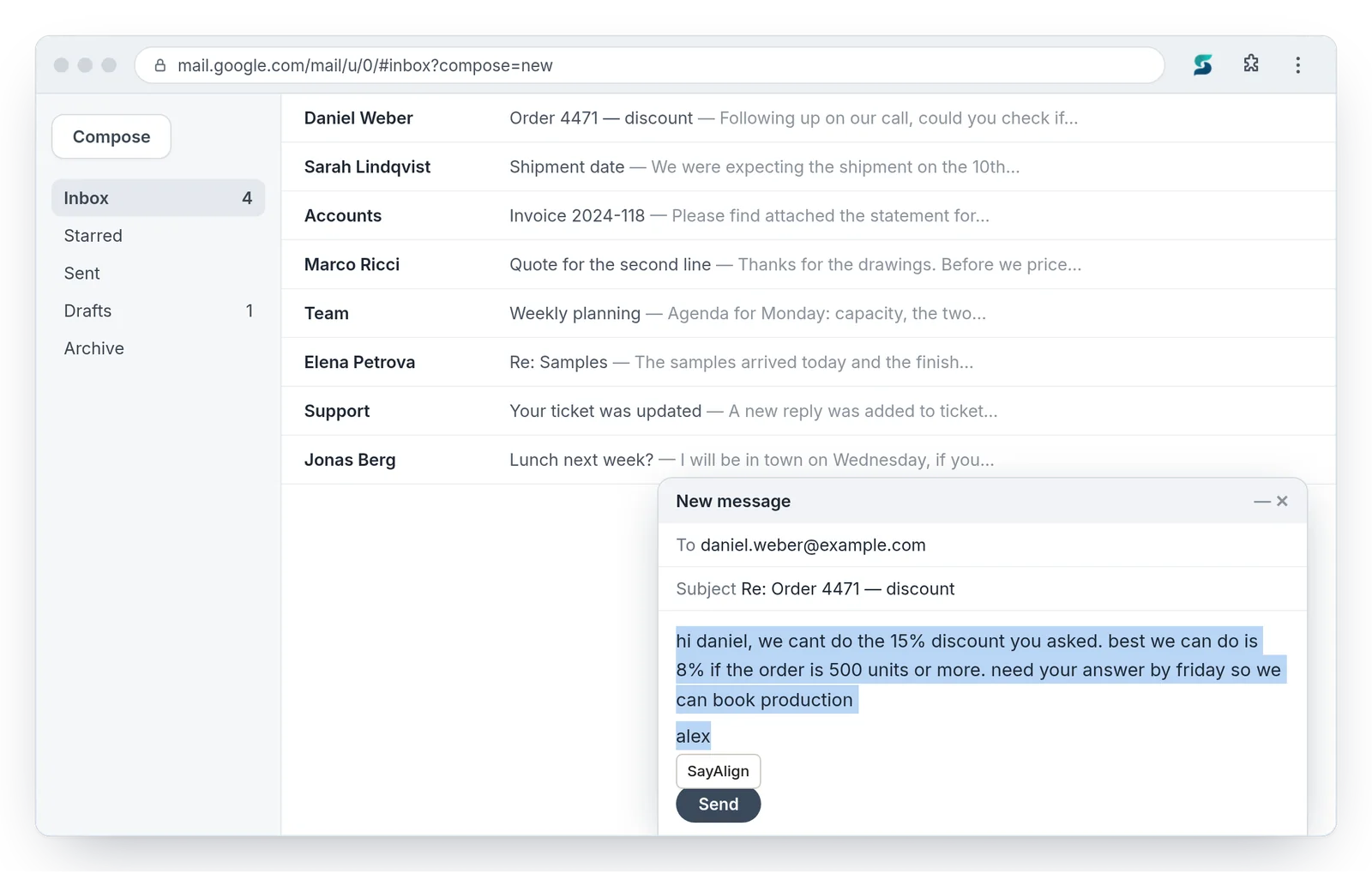
  1. Select your draft: A SayAlign button appears under the text you selected.

    1Select your draft

    A SayAlign button appears under the text you selected.

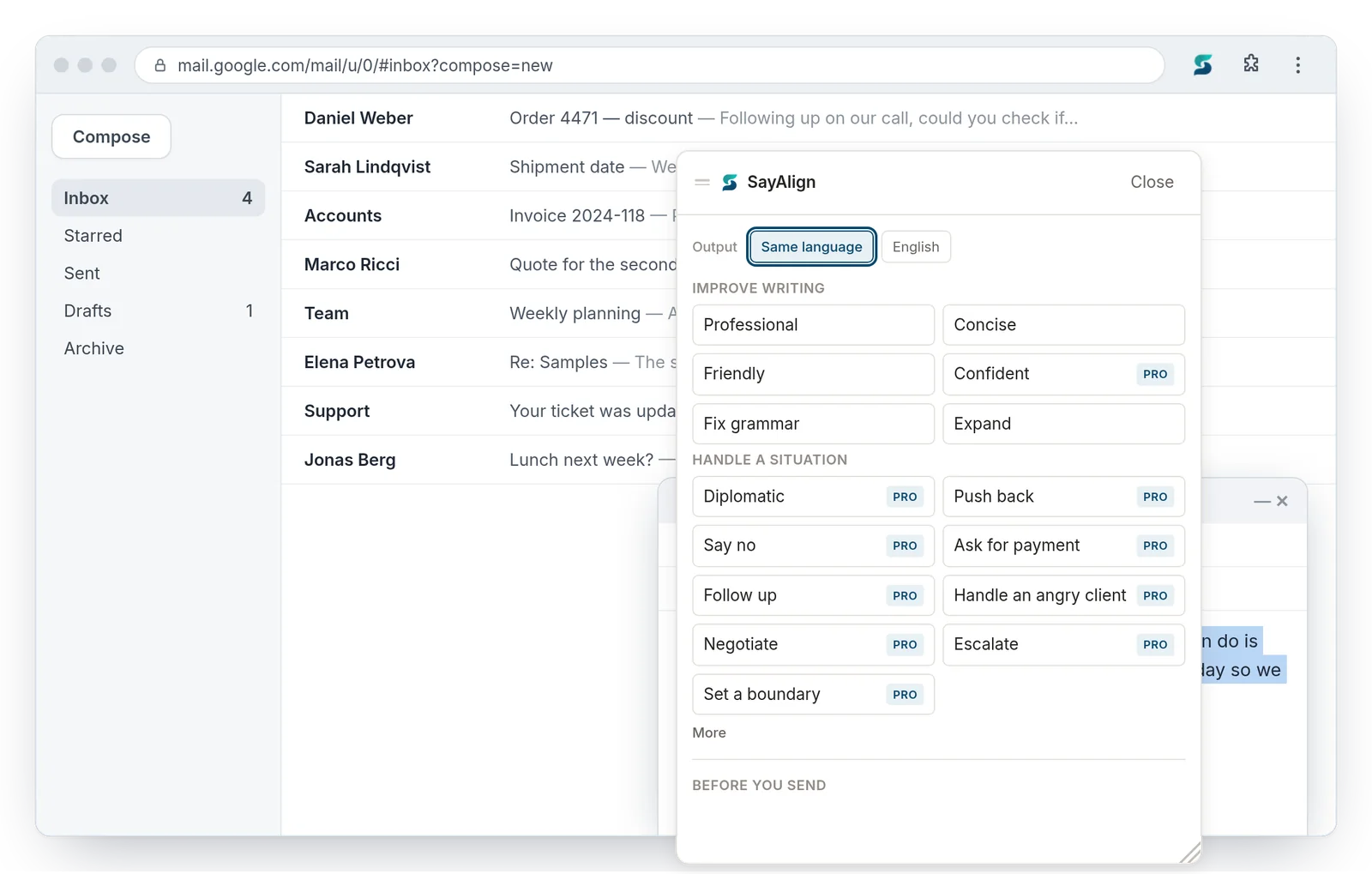
  2. Choose how it should read: Pick a tone, or the situation the message is for.

    2Choose how it should read

    Pick a tone, or the situation the message is for.

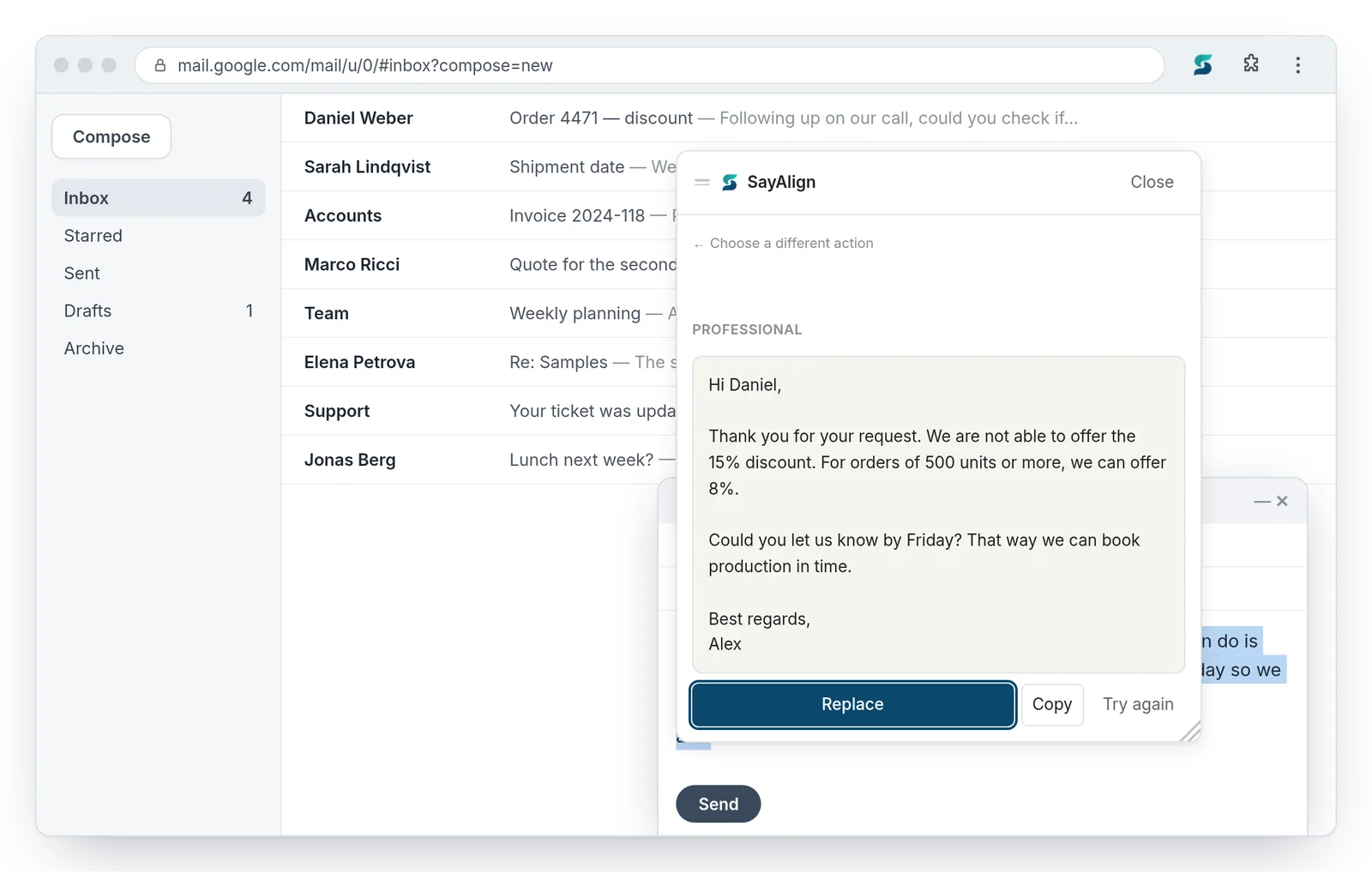
  3. Read it, then decide: Replace, Copy or Try again. Nothing changes until you choose.

    3Read it, then decide

    Replace, Copy or Try again. Nothing changes until you choose.

Replying works the same way from the message you received. Step-by-step guide for Chrome, Edge, Gmail, Outlook and LinkedIn →

For the messages that decide something

Built for people in purchasing, sales and client work who write about money, dates and terms — and need the message to land without changing what you mean.

Price talks with suppliers and customers

A 15% increase you cannot accept. A counter-offer that must not reveal your real limit.

Says no to the number, proposes yours, and keeps the figures you wrote. Your walk-away point stays in your notes.

  • Push backPro
  • NegotiatePro
  • Say noPro
Supplier negotiation →

Late payments

Invoice 4471 is 45 days overdue and the polite reminders have not worked.

States what is owed, since when and what happens next, without apologising for asking. Invoice number, amount and days are compared.

  • Ask for paymentPro
  • Follow upPro
  • EscalatePro
Invoice follow-up →

LinkedIn conversations that turn into work

A prospect, a recruiter or a buyer writes on LinkedIn, and the reply needs to be right the first time.

Drafts the reply in the conversation, in the language they wrote in, from your notes or none.

  • Just reply
  • Follow upPro
  • Set a boundaryPro
LinkedIn messages →

Also: say no, follow up, answer an angry client, escalate, set a boundary — and everyday rewrites (Professional, Concise, Friendly, Fix grammar, Expand) on Free. More examples.

Who makes SayAlign

Made for messages where the wording costs money

SayAlign is made by Areonex, a small independent software company in Toronto. We build it for people in purchasing, sales and client work: price negotiations, payment reminders and delivery disputes, where a softened sentence or a changed figure has a cost.

That is why it works the way it does. You see every result before it goes into your message, the figures are compared before you replace anything, and nothing is sent until you send it.

Questions, or a message that did not come out right? Write to support@sayalign.com — a person answers.

You stay in control of what goes out

SayAlign suggests; you decide. Nothing goes into your message until you press Replace or Insert, and SayAlign never sends anything. Three checks help you read the result.

CheckWhat it looks atWhat it can doUses
Fact GuardAmounts and currencies, dates and times, percentages, quantities, invoice and order numbers it recognises — your text against the result.Holds Replace when one of them changed, or when a figure appears that you did not write; warns otherwise. In situations it only warns. Copy always works.Nothing — runs in your browser on every result
Meaning reviewAn AI reading of your text and the result: a refusal softened, a promise or deadline you did not make.Warns and quotes the words. Never blocks or edits.Nothing — included with most results
Before you sendYour whole draft: placeholders, impossible or past dates, a request with no date; on request, what the message commits you to.Lists what it found. Changes nothing.Instant checks free; the AI check uses a check (5/month Free, 250 Pro)

No warning is not a guarantee: these are checks, not proof. How each check works.

What is sent, and when

When you useWhat is sent
Rewrite, or a situation such as Push backThe text you selected.
ReplyThe message you are answering — the part you selected, or the latest message in the conversation when you start from the reply box — and your notes, if you wrote any.
Meaning review (after most results)The text that action started from and the result it produced.
Check what this commits me to (only when you press it)The whole draft you are writing.
Fact Guard and the instant checksNothing. They run in your browser.

Text is sent to SayAlign’s service and on to our AI provider, OpenAI, only to produce the result. SayAlign does not store it. OpenAI may keep request data for a limited period to detect abuse, under its own API policy, and does not use it for training. Your inbox list, contacts and other conversations are not sent.

Full privacy policy.

Free to start. Pro when the conversations get harder.

Prices in USD, plus tax where applicable. Full pricing and billing terms.

Free

$0/month

20 actions in your first month, then 10 each month. No card.

For trying it on everyday emails.

Try SayAlign free
  • Professional, Concise, Friendly
  • Fix grammar, Expand notes
  • Replies in the message’s own language
  • Fact Guard on every result
  • 5 checks before sending a month

Pro

Monthly

$11.99/month

1,000 actions a month. Cancel any time.

For people who negotiate, chase payments or push back every week.

Get Pro monthly
  • Everything in Free
  • All eight situations: push back, say no, ask for payment, follow up, angry client, negotiate, escalate, set a boundary
  • Confident, Diplomatic, your own instruction
  • 250 checks before sending a month

Pro

Yearly · save 37%

$89.99/year

Paid once a year in advance — about $7.50 a month.

The same Pro, for a year.

Get Pro yearly
  • Everything in Pro monthly
  • 1,000 actions every month
  • $53.89 less than twelve monthly payments

Get started in four steps

No new tab, no copying into a chatbot. SayAlign works in the message you are already writing. Full guide with pictures.

  1. 01

    Install SayAlign

    Add the extension to Chrome, Edge or Safari, then sign in from its toolbar icon.

    Get the extension →
  2. 02

    Open your message

    Write or reply in any of these — one extension, the same panel everywhere.

    GmailOutlookLinkedIn
  3. 03

    Choose what you want to do

    Select the text and pick a tone, or name the situation.

    ProfessionalConciseDiplomatic ProPush back ProFollow up ProNegotiate Pro
  4. 04

    Review the result

    Nothing changes in your message until you press Replace or Insert. Read it, look at any figure Fact Guard flags, then Replace or Copy.

    Preview firstFigures comparedYou send it

Where it works

A Chrome, Edge and Safari extension for desktop. Works in Gmail, Outlook on the web and LinkedIn messages, with other webmail in beta. It reads only the text you select, plus the message you are answering when you ask for a reply — nothing else on the page.

Gmail

Compose and reply. Selecting an incoming message offers a reply in its language.

Outlook on the web

outlook.office.com, outlook.live.com and Microsoft 365 mail: compose and reply.

LinkedIn messages

LinkedIn Messaging: reply, follow up and handle the conversations that turn into work.

How it works on LinkedIn →

Yahoo, Yandex, Proton, Zoho and other webmail services (beta), and webmail on your own domain: see the list and how to turn it on.

Questions

What is SayAlign?

A browser extension for Chrome and Edge on a computer, and for Safari on a Mac. It rewrites the message you are writing, or drafts a reply to the one you received, inside Gmail, Outlook on the web and LinkedIn messages. Nothing goes into your message until you press Replace or Insert, and SayAlign never sends anything.

Does it work on my phone, in Safari or in the Outlook desktop app?

Safari, yes: on a Mac with Safari 18.4 or later, downloaded from the Download page. Phones and the Outlook desktop app, no. It runs in Chrome, Edge (and other Chromium browsers) and Safari on a computer, in the web versions of Gmail and Outlook.

What can I do on Free?

20 actions in your first month, then 10 each month, no card. Free includes Professional, Concise, Friendly, Fix grammar and Expand, replies in a professional, friendly or concise tone, and 5 checks before sending a month. Push back, Say no, Negotiate and the other situations, Confident, Diplomatic and your own instruction are Pro.

What counts as an action?

Each generated rewrite, reply or situation message, and each Try again. Opening the panel, choosing an option or copying a result costs nothing, and a request that fails is not counted. Checks before sending have their own allowance.

Does SayAlign store my emails?

No. The text involved in an action is sent to SayAlign’s service and on to our AI provider, OpenAI, to produce the result, and SayAlign does not store it. OpenAI may keep request data for a limited period to detect abuse, under its own API policy. The privacy policy has the details.

Does it check that the result is right?

Partly, and it says which part. Fact Guard compares the amounts, dates, percentages, quantities and reference numbers it recognises, and holds Replace when one of them changed in a rewrite. An AI meaning review then warns if a refusal was softened or a commitment added. Neither proves a message is correct, so read the result before you use it.

Which languages does it write in?

The panel has two output settings. Same language: a reply comes back in the language the other person wrote in, and a rewrite stays in the language of your draft, whatever language that is. English: the result is in English. Fact Guard compares amounts, percentages and numeric dates in any language.

Can I cancel Pro?

Yes, any time from your dashboard. Pro renews automatically until you cancel, and you keep it until the end of the period you paid for. If the product does not work as described, write to us for a refund; the terms explain how.

The next hard email is already in your drafts.

Create a free account, add SayAlign to Chrome, Edge or Safari, and select the sentence you have been rewriting for ten minutes.

Try SayAlign free

20 actions in your first month, then 10 each month. No card needed.

Get the extension →